Fix implicit conversions
The problem with implicit conversions
Implicit conversions happen when SQL Server has to convert one data type into another to perform an operation.
For example, if you compare a VARCHAR column with an NVARCHAR value, SQL Server has to convert the column value to NVARCHAR before it can make the comparison.
This can lead to a full scan of the index or the table instead of a fast index seek.
Here is an example of a query that causes the problem, on the PachaDataFormation demo database. In the Contact.ProspectUS_SQL_Latin1 table, the columns are VARCHAR with a SQL collation (SQL_Latin1_General_CP1_CI_AS). First create an index on the Nom column:
CREATE INDEX nix_prospectus_sql_latin1_nom
ON Contact.ProspectUS_SQL_Latin1 (Nom);
GO

DECLARE @Nom NVARCHAR(50) = N'Klein';

SELECT Prenom, Nom
FROM Contact.ProspectUS_SQL_Latin1
WHERE Nom = @Nom;
Nom is a VARCHAR column in the database, but the @Nom parameter is NVARCHAR (which is the ADO.NET default when the parameter type is not specified). SQL Server therefore has to convert the Nom column to NVARCHAR before it can make the comparison.
This prevents an index seek on the Nom column: SQL Server scans the whole index. In some cases the conversion can also skew the estimate of the number of rows returned (the cardinality estimation).
Why implicit conversions can convert the column rather than the parameter
When SQL Server has to compare two values of different data types, it can implicitly convert one of them so that the types are compatible.
The general rule is that SQL Server converts to the data type with the higher precedence.
This means that if a column is VARCHAR and a parameter is NVARCHAR, SQL Server converts the column to NVARCHAR rather than converting the parameter to VARCHAR.
You can understand this precedence rule as follows:
Minimizing data loss: converting a
VARCHARvalue toNVARCHARis less likely to cause data loss than the reverse. For example, if you convert anNVARCHARvalue toVARCHAR, you could lose characters if theNVARCHARvalue contains characters that cannot be represented inVARCHAR.Consistency and predictability: by following a clear precedence hierarchy, SQL Server can make sure that data type conversions are performed in a consistent and predictable way.
ADO.NET and NVARCHAR
When the type of a parameter is not specified, for example with AddWithValue, ADO.NET infers the NVARCHAR type from a .NET string. This can be a problem if the database columns are VARCHAR. SQL Server then has to convert the column data to NVARCHAR before it can make the comparison, which can cause performance problems.
For example, if you have a table with a VARCHAR column Nom and you use ADO.NET to run a query with an NVARCHAR parameter, SQL Server has to convert the Nom column to NVARCHAR before it can make the comparison.
Identifying implicit conversions
To identify implicit conversions in your queries, you can use SQL Server execution plans. Execution plans show how SQL Server runs a query and can include information about implicit conversions.
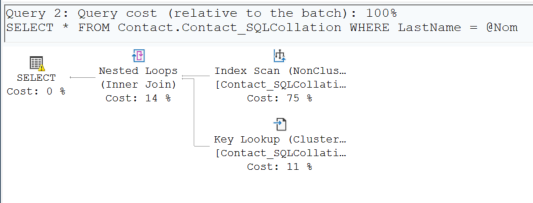
The screenshot was taken on an older version of the demo database, in a Contact.Contact_SQLCollation table whose LastName column has a SQL collation. The example above produces the same seek warning.
In this plan, you see a warning icon on the SELECT operator, which summarizes the statement. This warning reports that an implicit conversion may affect the choice of plan. Not every implicit conversion produces one: when it is the parameter that is converted to the column type, the plan shows none. Hovering over the icon shows details about the implicit conversion, including the data types involved.
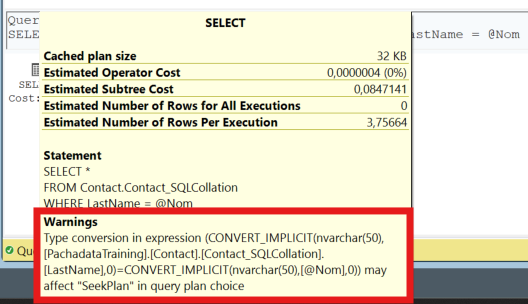
The warning can point to two problems: a performance problem caused by the impossibility of using an index seek, and a cardinality estimation problem. The cardinality estimation problem is sometimes harmless (an implicit conversion in the SELECT list), but the seek warning relates to an implicit conversion in a predicate, and it is a sign that the query needs to be optimized.
That is the case in the example above, where the implicit conversion prevents the index seek on the Nom column.
There is a special case. When a VARCHAR column with a Windows collation has to be implicitly converted to NVARCHAR, SQL Server can still perform an index seek, because it knows that the comparison rules are the same for an ANSI string and a Unicode string under this kind of collation. The plan then shows no warning. This is the case of the Contact.Contact table in PachaDataFormation, with the French_CI_AS collation: with an NVARCHAR parameter, the query on Nom performs a seek on the nix_contact_nom index, with no warning.
Detecting implicit conversions
You can trace these warnings with an Extended Events session. You will find the session creation script on my GitHub.
Video on my YouTube channel (in French): SQL Server - Bien utiliser évènements étendus (Extended Events)
You can also query the plan cache to find plans with implicit conversions.
Fixing implicit conversions
To fix implicit conversions, you need to change the data types in your queries so that they match the data types in the database. For example, if the Nom column is VARCHAR, you can change your query to use a VARCHAR parameter instead of NVARCHAR.
Here is an example of a fix:
// Before: NVARCHAR used by default
command.Parameters.AddWithValue("@Nom", Nom);

// After: VARCHAR stated explicitly, with the column size
command.Parameters.Add("@Nom", SqlDbType.VarChar, 50).Value = Nom;
Specify the size as well: without it, the parameter length is inferred from the value sent, and the same query arrives with different varchar(n) declarations depending on the length of the name.
Entity Framework and implicit conversions
By default, Entity Framework can use data types that do not exactly match the data types in the database. For example, if you have a VARCHAR column in your database, Entity Framework could use a .NET data type that maps to NVARCHAR in SQL Server. This can cause implicit conversions when queries run.
In earlier versions of Entity Framework, as in Entity Framework Core, strings map to NVARCHAR by default. Entity Framework Core lets you specify the type of each property, with HasColumnType, with IsUnicode(false) or, since EF Core 6, with the [Unicode(false)] attribute.
Here is an example of how to specify the data type of a property in Entity Framework, for the Contact.Contact table of PachaDataFormation:
public class Contact
{
    public int ContactId { get; set; }

    [Column(TypeName = "varchar(50)")]
    public string Nom { get; set; }
}
In this example, the Nom property maps to a VARCHAR(50) column in the database. This can help avoid implicit conversions when queries run.
You can also configure data types in the entity configuration class. For example, if you use the Fluent API to configure your model, you can specify the data type as follows:
modelBuilder.Entity<Contact>()
    .Property(c => c.Nom)
    .HasColumnType("varchar(50)");
This makes sure that the Nom column maps to a VARCHAR type in the database, which can help avoid implicit conversions.
Here is a complete example of an entity configured with the Fluent API to avoid implicit conversions, in a dedicated Entity Framework Core class:
public class ContactConfiguration : IEntityTypeConfiguration<Contact>
{
    public void Configure(EntityTypeBuilder<Contact> builder)
    {
        builder.Property(c => c.Nom)
            .HasColumnType("varchar(50)")
            .IsRequired();
    }
}
The configuration is applied in OnModelCreating, with modelBuilder.ApplyConfiguration(new ContactConfiguration());. In this example, the Nom property is configured to map to a VARCHAR(50) column in the database.