SARGability of WHERE clauses
Categories:
7 minute read
Applying a function to a column in the WHERE clause stops SQL Server from using the indexes on that column. Such a query is called non-SARGable. The result: an Index Scan, a full traversal, instead of an Index Seek, a direct lookup.
The most frequent culprits: COALESCE, ISNULL, CONVERT, YEAR(), LEFT(), TRIM() applied to the filtered columns.
The fix: move the logic to the value or the parameter side, never to the column side.
The code that hurts
Look at this query:
SELECT Label
FROM dbo.Product
WHERE ( COALESCE( Is_archived, '' ) = '' )
  AND ( COALESCE( Is_visible, '' ) = '' );
I run into this kind of code regularly during audits. It may be generated by an ORM or written by hand. Either way the query cannot use the indexes. COALESCE wraps the WHERE columns in a function, and SQL Server has no choice left but to walk the entire table, evaluating every row.
This is a SARGability problem.
What is SARGability?
SARGable comes from Search ARGument-able. A SARGable predicate is one the query optimizer can resolve using an index.
The simplest analogy is looking a word up in a dictionary.
- If you are looking for the word “index”, you open the dictionary at I and go straight there. That is an Index Seek.
- If you are looking for every word containing “dex” somewhere, you have to go through every page. That is an Index Scan, or a Table Scan: a full traversal of all the stored values, testing each one to the last.
When you apply a function to a column in the WHERE clause, you turn a first-letter lookup into a search of the whole dictionary.
flowchart TD
    A[Query with a WHERE clause] --> B{SARGable predicate?}
    B -->|Yes| C[Index Seek]
    B -->|No| D[Index Scan]
    C --> E["Targeted read: a few pages"]
    D --> F["Full read: every page of the index"]
    E --> G[Optimal performance]
    F --> H[Degraded performance]
On a table of a few thousand rows the difference may look small. In production, the query gets slower and slower as the table grows.
The functions that break your indexes
Here are the most frequent anti-patterns, with their SARGable rewrites:
| Anti-pattern | Non-SARGable example | SARGable rewrite |
|---|---|---|
COALESCE in the WHERE | WHERE COALESCE(Col, '') = 'X' | WHERE Col = 'X' OR Col IS NULL |
ISNULL in the WHERE | WHERE ISNULL(Col, 0) = 1 | WHERE Col = 1 if NOT NULL, otherwise WHERE Col = 1 OR Col IS NULL |
TRIM / LTRIM / RTRIM | WHERE LTRIM(RTRIM(Col)) = 'abc' | WHERE Col = 'abc', and clean the data on insert |
CONVERT / CAST on a date | WHERE CONVERT(DATE, Col) = '2025-01-01' | WHERE Col >= '2025-01-01' AND Col < '2025-01-02' |
LEFT / SUBSTRING | WHERE LEFT(Col, 3) = 'ABC' | WHERE Col LIKE 'ABC%' |
YEAR() / MONTH() / DAY() | WHERE YEAR(DateCol) = 2025 | WHERE DateCol >= '2025-01-01' AND DateCol < '2026-01-01' |
UPPER / LOWER | WHERE UPPER(Col) = 'ABC' | Use a case-insensitive (CI) collation |
| Scalar UDF | WHERE dbo.fn_Check(Col) = 1 | Rewrite the logic inline |
The classic cases, and how to fix them
One of the most common reasons for a function in a WHERE clause is the use of TRIM, LTRIM or RTRIM, or LOWER and UPPER, to search on trimmed strings or to search case-insensitively.
TRIM in the WHERE clause is usually pointless:
RTRIMachieves nothing, because SQL Server ignores trailing spaces in string comparisons — otherwise comparingCHARvalues would be a nightmare.LTRIMis usually pointless too. If you have leading spaces in your data, the data was not clean on insert. The right fix is to clean it on insert, not on every read.
UPPER and LOWER are generally used out of habit inherited from engines that are case-sensitive by default, such as Oracle or PostgreSQL. In SQL Server most instances are installed with a case-insensitive (CI) default collation, so there is no need for UPPER or LOWER to compare case-insensitively.
The COALESCE case
COALESCE prevents the seek almost “more” than the other functions — which means nothing, I know, but bear with me.
Internally, SQL Server translates COALESCE into a CASE WHEN expression. When you write:
WHERE COALESCE([Is_archived], 0) = 0
SQL Server actually sees:
WHERE CASE WHEN [Is_archived] IS NOT NULL THEN [Is_archived] ELSE 0 END = 0
The optimizer cannot unwind that expression back into a simple predicate on the column. It has to evaluate the CASE WHEN for every row of the table before it can filter. That is the definition of an Index Scan.
NOT NULL, SQL Server can eliminate the ISNULL call at compile time, knowing the value can never be NULL. COALESCE is not simplified the same way. It is a documented behavioural difference, described by Erik Darling. Worth knowing — but in practice, use neither in a WHERE clause, and avoid the risk of losing SARGability altogether.Implicit conversions
Another frequent cause of lost SARGability: implicit conversions. When the data type of the parameter does not match the type of the column, SQL Server automatically converts one side of the comparison.
The problem is that SQL Server always converts the side with the lower precedence in the type hierarchy. If that is the column, the index is lost.
I covered this in the article on implicit conversions.
Since SQL Server 2022, the query_antipattern extended event automatically detects implicit conversions and other anti-patterns in queries. Set it up on your test environments to catch these problems before they reach production.
See Bob Ward’s post on the subject.
When you cannot change the code
This is the classic situation with software vendors: you have no access to the source code, and the vendor will not fix the problem any time soon. Two options remain on the database side.
1. Computed columns plus an index
You can create a computed column reproducing exactly the expression used in the WHERE, then index that column. In theory, SQL Server automatically matches the function in the query to the computed column.
For example:
-- Add the computed column
ALTER TABLE dbo.Product
ADD Is_archived_safe AS ISNULL(Is_archived, 0);

-- Index the computed column
CREATE INDEX IX_Product_Computed
ON dbo.Product (Is_archived_safe)
INCLUDE (Label);
GO
There are practical problems with this:
- The match between the function in the
WHEREand the computed column has to be exact.ISNULL(Col, 0)will not matchCOALESCE(Col, 0)— to the optimizer these are different functions.LTRIM(RTRIM(Col))will not matchRTRIM(LTRIM(Col)), norTRIM(Col). - The connection’s
QUOTED_IDENTIFIERandANSI_NULLSSET options must both beONfor the match to work. - The match is fragile and unreliable. For more on this, see Paul White’s article Properly Persisted Computed Columns.
2. Constraints and modeling
If the problem is a NULL test, you can make the columns NOT NULL, and add a DEFAULT constraint. If Is_archived cannot be NULL, the optimizer eliminates the ISNULL().
-- Clean up the existing NULLs
UPDATE dbo.Brand SET Is_archived = 0 WHERE Is_archived IS NULL;

-- Add the constraints
ALTER TABLE dbo.Brand
ALTER COLUMN Is_archived bit NOT NULL;

ALTER TABLE dbo.Brand
ADD CONSTRAINT DF_Brand_Is_archived DEFAULT (0) FOR Is_archived;
GO

SELECT TRIM(Label) AS Label
FROM dbo.Product
WHERE ISNULL(Is_archived, 0) = 0
ORDER BY Label;
GO
The execution plan for that query is now an Index Seek, where it used to be an Index Scan.
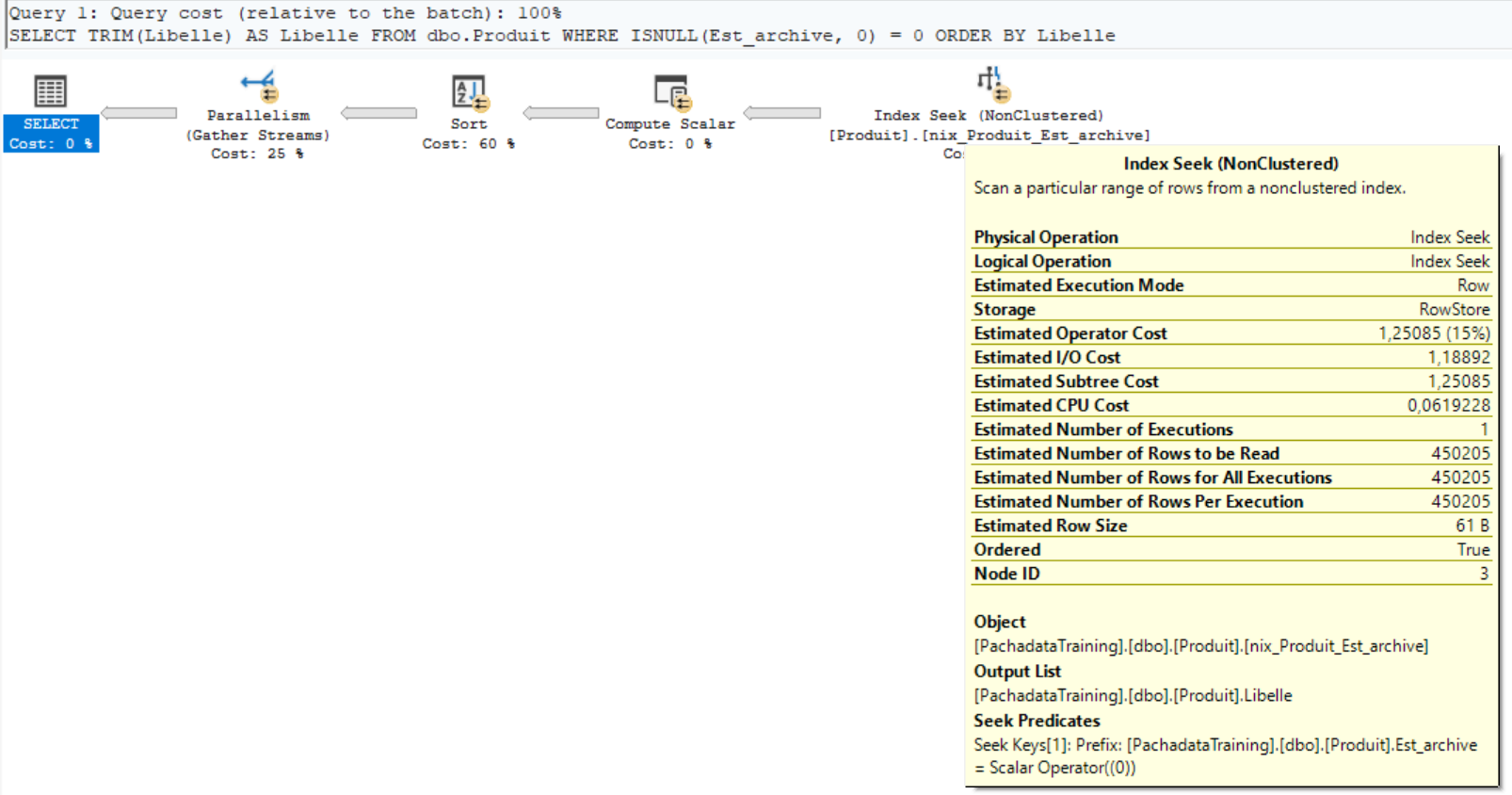
Here is a script to find the nullable columns that in fact contain no NULL at all — ideal candidates for NOT NULL:
-- Find the nullable columns that never actually hold a NULL
DECLARE @sql nvarchar(max) = N'';

SELECT @sql = @sql +
    'SELECT ''' + QUOTENAME(s.name) + '.' + QUOTENAME(t.name) + '.' +
    QUOTENAME(c.name) + ''' AS column_name, ' +
    'COUNT(*) AS row_count, ' +
    'SUM(CASE WHEN ' + QUOTENAME(c.name) + ' IS NULL THEN 1 ELSE 0 END) AS null_count ' +
    'FROM ' + QUOTENAME(s.name) + '.' + QUOTENAME(t.name) +
    ' UNION ALL '
FROM sys.columns AS c
JOIN sys.tables AS t ON c.object_id = t.object_id
JOIN sys.schemas AS s ON t.schema_id = s.schema_id
WHERE c.is_nullable = 1
  AND t.type = 'U'
ORDER BY s.name, t.name, c.name;

-- Strip the trailing UNION ALL
SET @sql = LEFT(@sql, LEN(@sql) - 10);

-- Keep only the columns with no NULL
SET @sql = N'SELECT * FROM (' + @sql + N') AS x WHERE null_count = 0 ORDER BY column_name;';

EXEC sp_executesql @sql;
Optimization strategies — a summary
A checklist for the T-SQL developer:
- Never put a function on a column in the WHERE clause — move the logic to the parameter or the value.
- Check the data types — parameters and columns must match, to avoid implicit conversions.
- Model with
NOT NULLandDEFAULTwherever you can. It is the cleanest solution. - Clean the data on insert, not on read. If you need
TRIM()in yourSELECTstatements, your data is not clean.